Tag: Tennis

  • The full Smashpoint experience, now on Google Play. Plus video replay for the points that matter.

    Smashpoint Google Play

    Android players, the wait is over. Smashpoint is now available on the Google Play Store, and it’s the complete app: everything you can do on iPhone, you can now do on Android.

    Everything, not a lite version

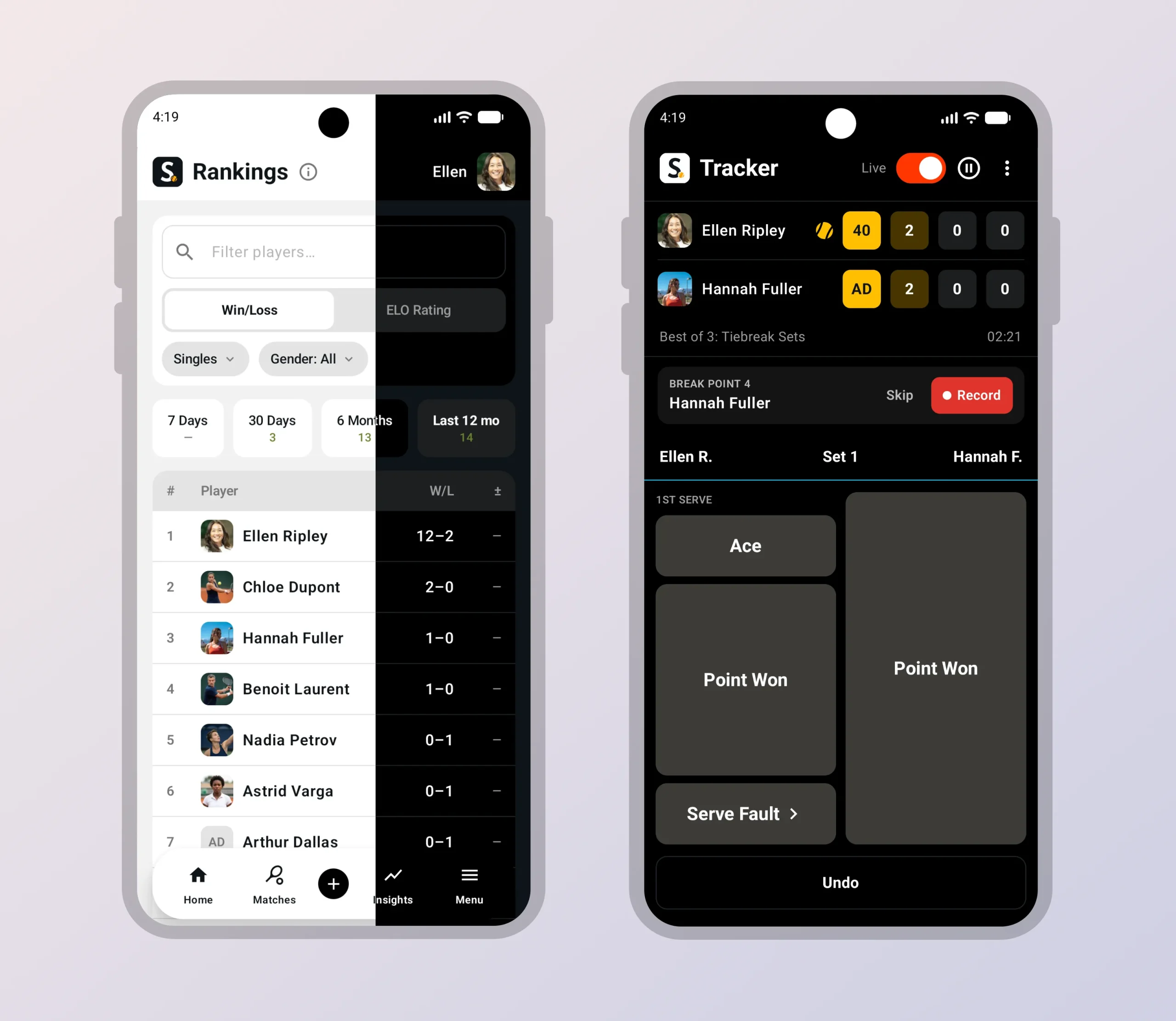
    We didn’t ship a stripped-down Android build to check a box. The Google Play version has the same five levels of live match tracking, from quick games-only scoring to full point-by-point detail with serve, rally and shot outcome. It has the same insights: ELO ratings, head-to-head records, momentum and pressure charts, and the shot quality breakdowns that show you what actually decided a match. It has the same saved match pages with the same Info, Analysis, Patterns, Stats and History tabs, so a match you tracked on Android looks identical when your doubles partner opens it on iPhone or on the web.

    Google Play

    Opt-in live broadcasting and shareable public match URLs work the same way too. Track a match courtside, and friends and family can follow along from any browser. And, as always, your data is private by default. Nothing is shared unless you choose to share it.

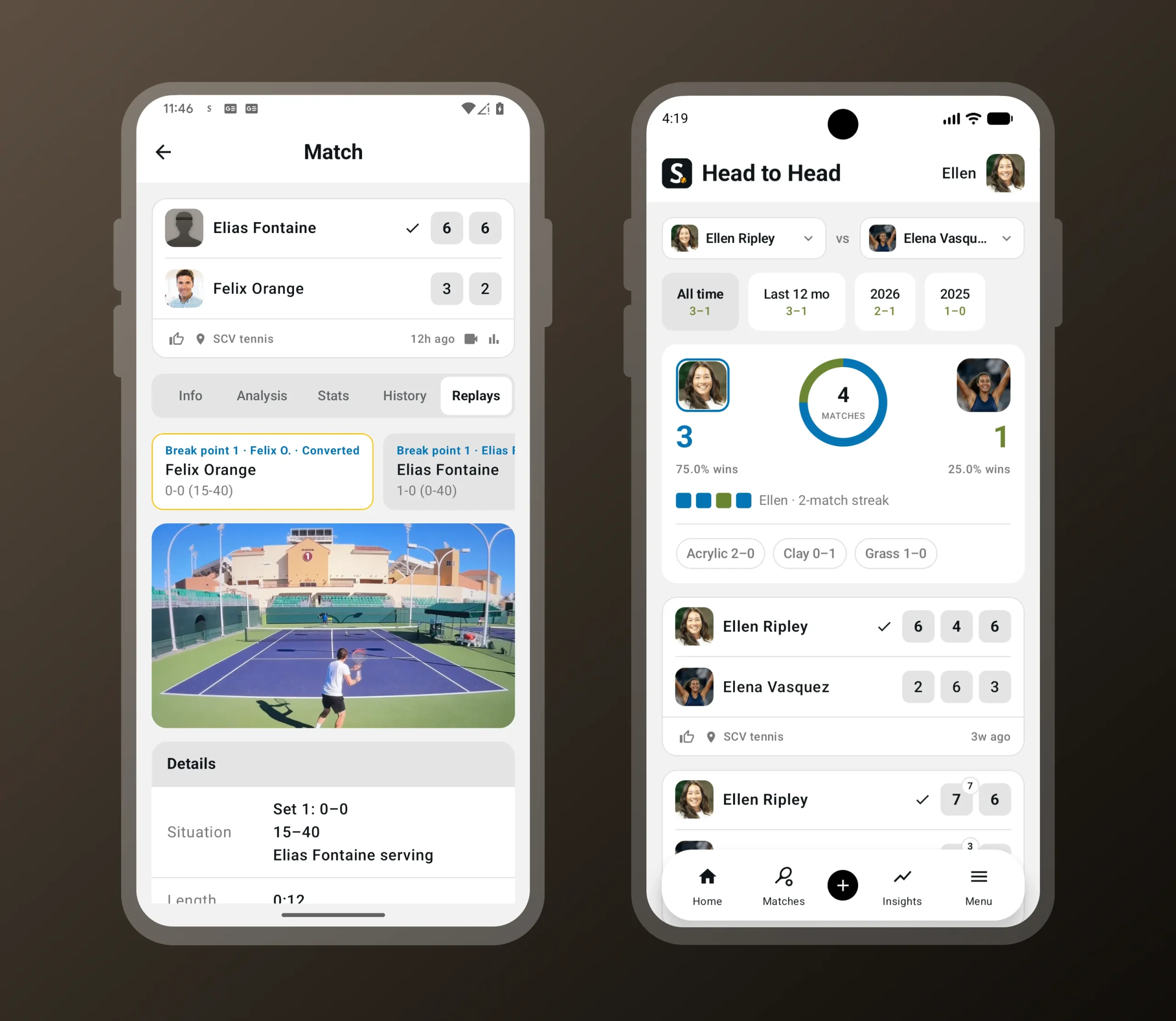
    When you’re tracking a match live and a critical point comes up, Smashpoint prompts you to record the next point. Break point, set point, match point: you choose which moments trigger the prompt, so you can capture only the biggest points or every swing in momentum. Hold up your phone, tap record, enter the outcome as usual, and the clip is saved with the match. No switching apps, no scrolling through your camera roll later trying to find the moment. Replays live in a new Replays tab on the saved match page and are linked directly to the point they belong to in the match history, so you can jump from “break point converted in the second set” straight to the footage.

    Video replay of a critical point in the Smashpoint Android app
    Record the next point when a break, set or match point comes up. Replays are saved with the match.

    New: video replay at critical points

    This release also introduces something new to Smashpoint on every platform: video replay.
    Smashpoint Google Play Store Tour

    Replays follow the same privacy rules as everything else in Smashpoint. Video is never shown on public match pages. Clips are only visible inside Smashpoint to you and the friends you’re connected with, and the recorder controls who those people are.

    Video replay is available on Android and iOS today, with playback on the web app and on Apple TV.

    One platform, every screen

    With Android on board, Smashpoint is now a complete platform:

    Track a match on your watch, review it on your tablet, share it from your phone, study the patterns on your laptop, and watch the replay on the big screen. Every app talks to the same account and the same data, so nothing is stranded on one device.

    That matters because Smashpoint isn’t built for one kind of user. Individual players use it to track their own matches and watch their game improve. Parents use it to record a child’s matches, including opponents who don’t have an account. Coaches use it to run practice sessions, compare players and spot what to work on next. Schools, clubs and federations use Smashpoint Organizations to manage rosters, ladders, tournaments and rankings across an entire program. Until now, an Android player on a team meant a gap in the picture. Not anymore.

    Get Smashpoint on Google Play

    Smashpoint for Android is free to download on Google Play. If you already have a Smashpoint account, just sign in and everything you’ve tracked will be there. If you’re new, you can sign up in the app with Google or with your email.

    Google Play

    Have an Android-specific request or found something that doesn’t feel right? Tell us. This is version one on a new platform, and the fastest way for it to get better is hearing from the people using it.
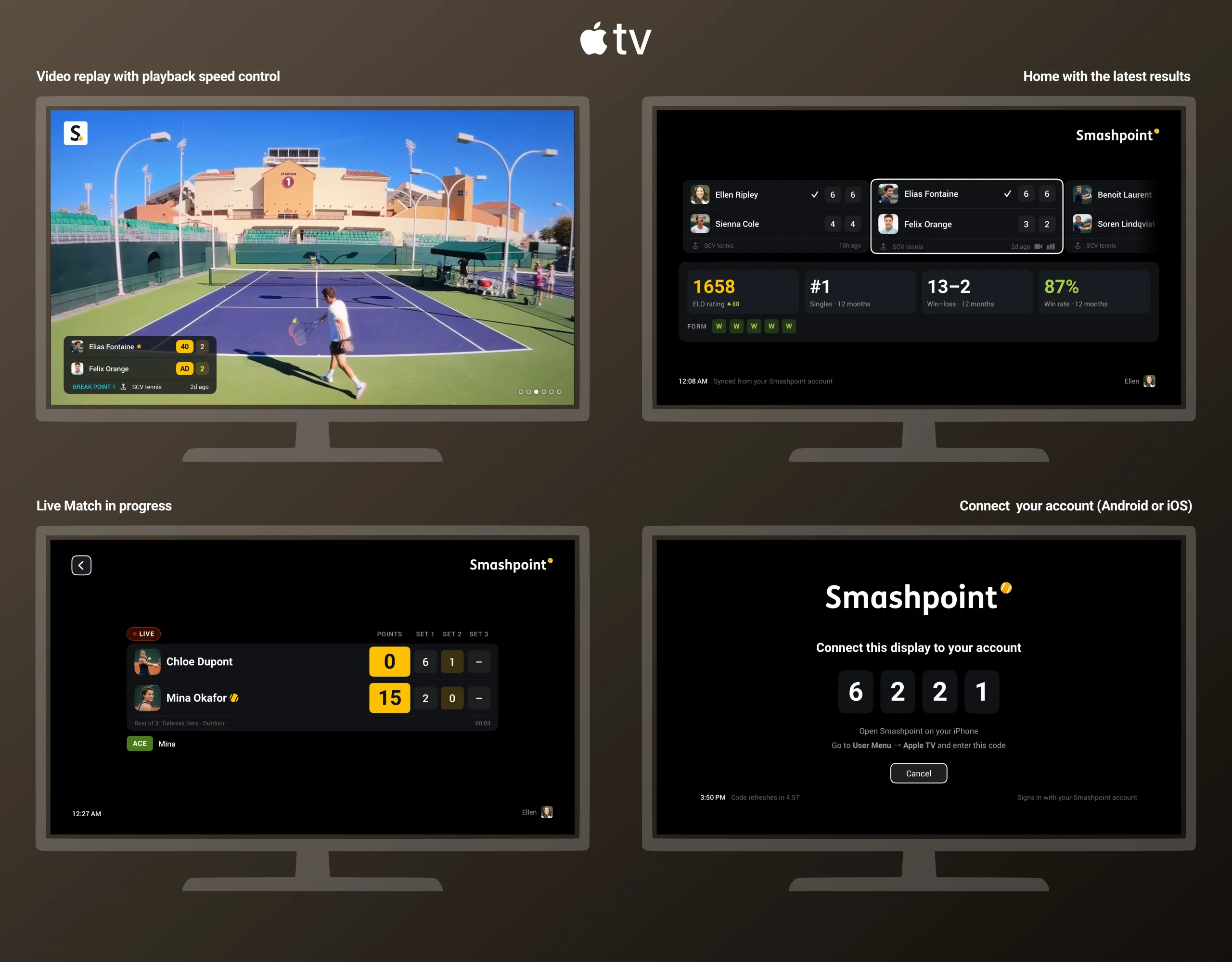
  • Smashpoint for Apple TV: Tennis Video Replay Comes to the Big Screen

    Smashpoint Apple TV App

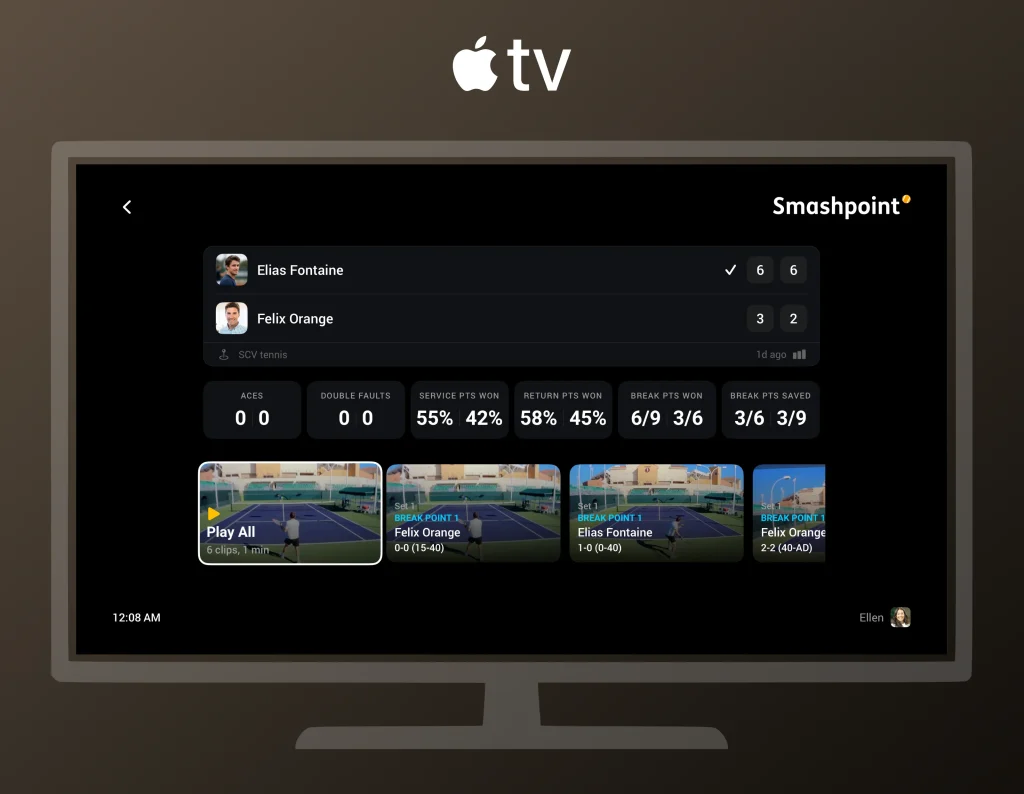
    Smashpoint for Apple TV has been the place to follow a match live from the couch: the scoreboard, the serve indicator, the set-by-set breakdown, all updating point by point as someone tracks courtside. Today it gets the feature it was waiting for. Video Replay is now on Apple TV, so the break points, set points and match points recorded on a phone show up on your TV, ready to watch.

    How it works

    Recording happens on the phone. When someone is tracking a match live on iPhone or Android and a critical point comes up, Smashpoint prompts them to record the next point. They hold up the phone, tap record, enter the outcome as usual, and the clip is trimmed and saved against that exact point in the match. The tracker decides which moments trigger the prompt: break points, set points, match points, or any combination.

    Watching happens on Apple TV. Open the match on your TV and the replays are right there next to the score. Pick a clip, see the context (which set, what score, who was serving), and watch the point. If you were following the match live, the replays land in the same view you already had open, so you don’t leave the scoreboard to find them.

    Replays appear alongside the score on Apple TV, labeled with the set, the score and who was serving.

    When replays show up

    Clips appear on Apple TV as soon as they’ve uploaded from the phone, and the person recording controls when that happens with one setting in the app.

    Smashpoint Apple TV App Tour

    With Upload on Wi-Fi only (the default), clips wait on the phone until it reaches Wi-Fi, which for most people means they appear on the TV after the match, once the phone is back home or at the club. With Upload on mobile data, clips upload from the court as soon as they’re recorded, so someone watching live at home can see a set point replay minutes after it happened, while the match is still going on. Either way, the recorder can tap Upload now on any single clip to send it right away.

    The choice is about data usage, not quality. Clips are the same on both settings; the only difference is when they leave the phone.

    Private by default, like everything in Smashpoint

    A replay is visible only to the person who recorded it until they choose to share it with the friends they’re connected with in Smashpoint. Sharing is per clip, and video is never shown on public match pages. That’s true on Apple TV too: the TV shows the clips the paired account is allowed to see, and nothing else. A parent who records their child’s matches sees every clip on the family TV. A connected coach sees the clips the parent chose to share. Nobody else sees any of it.

    Getting set up

    Smashpoint for Apple TV is free. Install it from the App Store on your Apple TV, open it, and enter the short code it shows into the Smashpoint app on your iPhone. From then on, everything that account can see in the app is on the TV: live matches, completed matches, season stats and now replays. One Apple TV can be paired to more than one account, so a household with two players or a clubhouse with a shared screen can switch between them.

    To record, update Smashpoint on iPhone or Android to the latest version, start a live match in any point-tracking mode, and switch on Record Video on the Format step. The app will ask for camera and microphone permission the first time.

    Google Play

    With this release, Smashpoint runs on iPhone, iPad, Apple Watch, Android, the web and Apple TV, and Smashpoint Cloud computes and stores all of it. Every match, rating, stat and replay lives in one place, so each device can do what it’s best at: the phone and watch track courtside, the web app gives you a desktop-class experience for digging into patterns and stats, and the TV is where the whole family watches. If you have an Apple TV in the house, this is the best way to relive a match.

  • Web App Beta 2

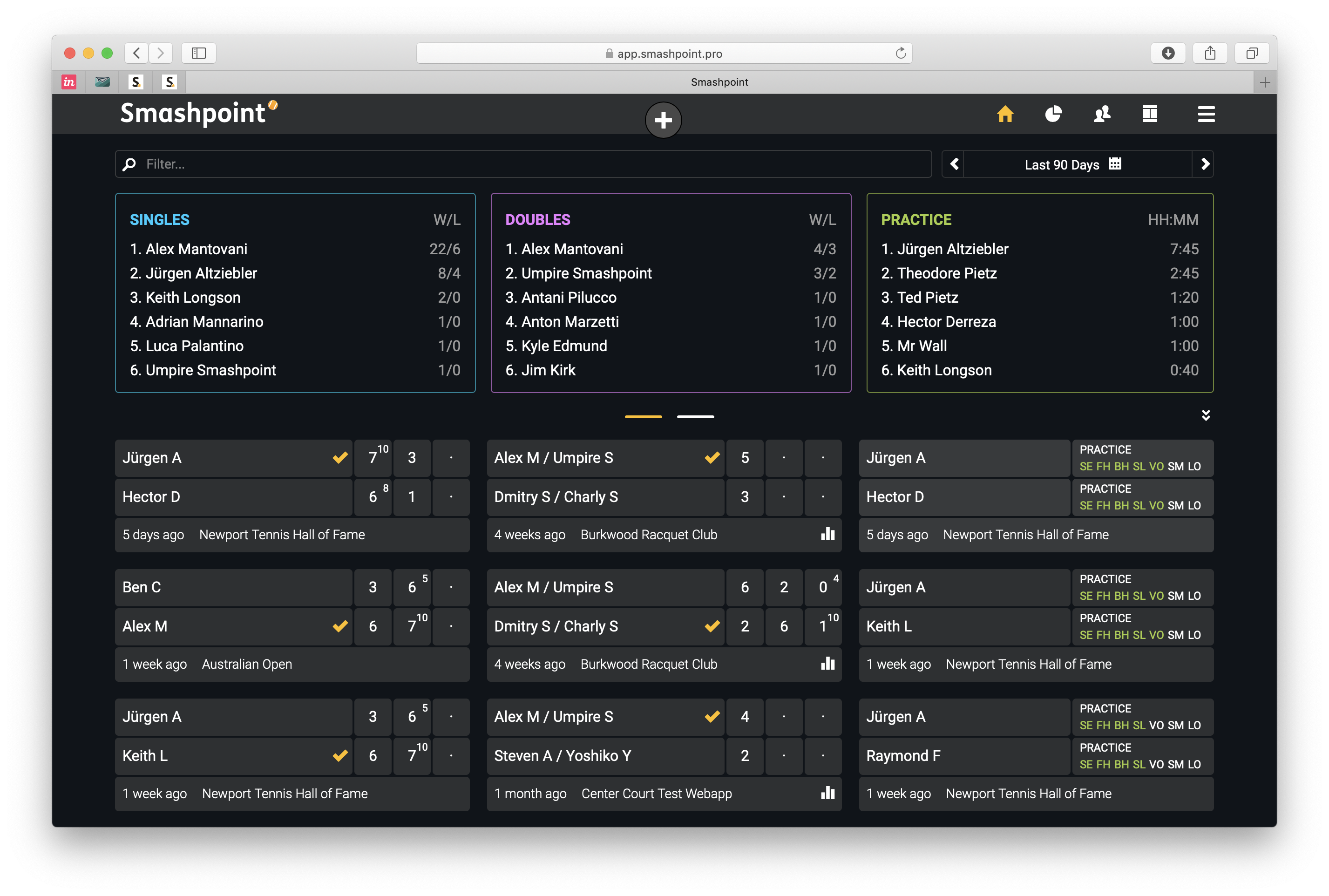
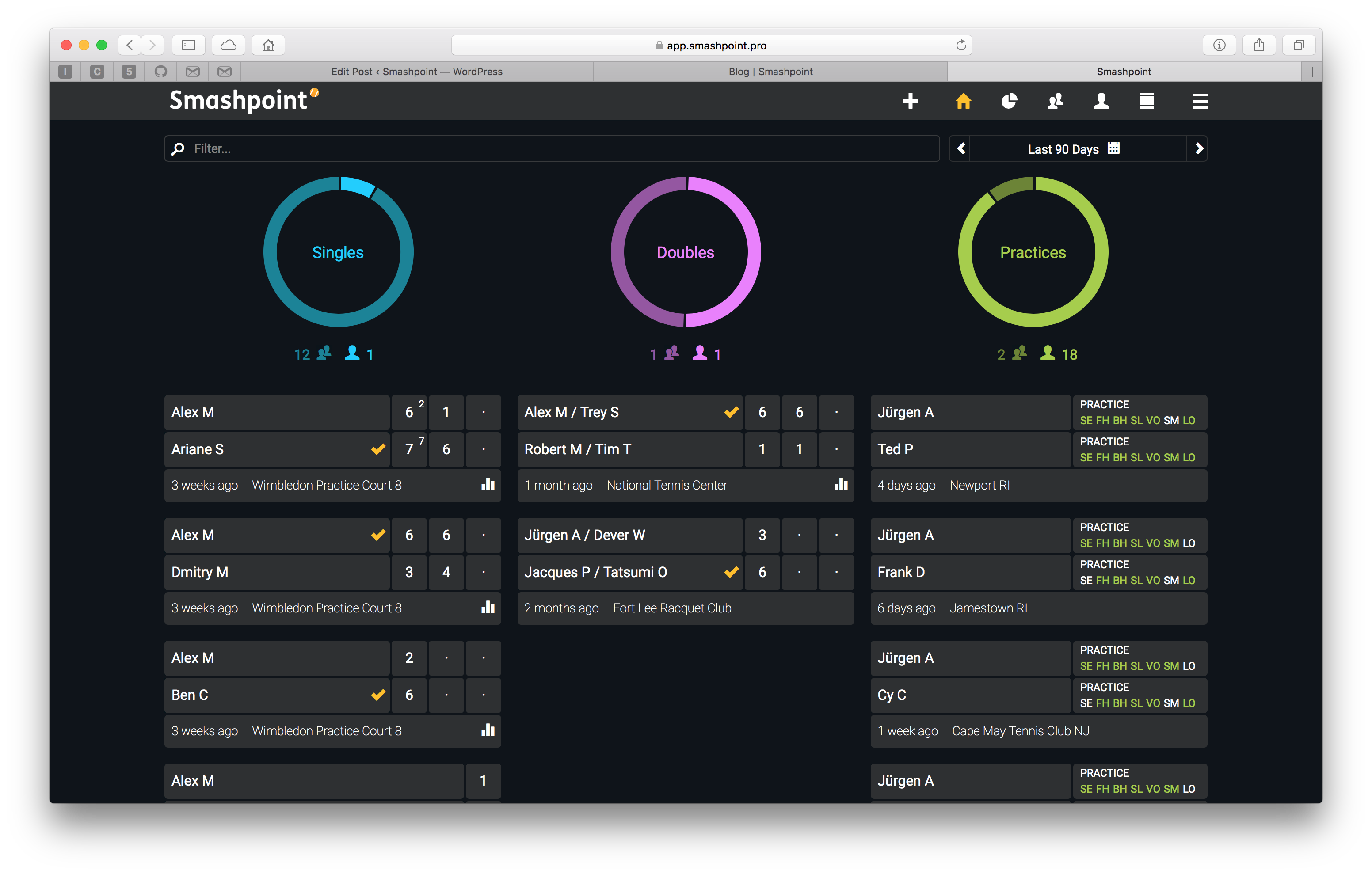
    Smashpoint Web App Home

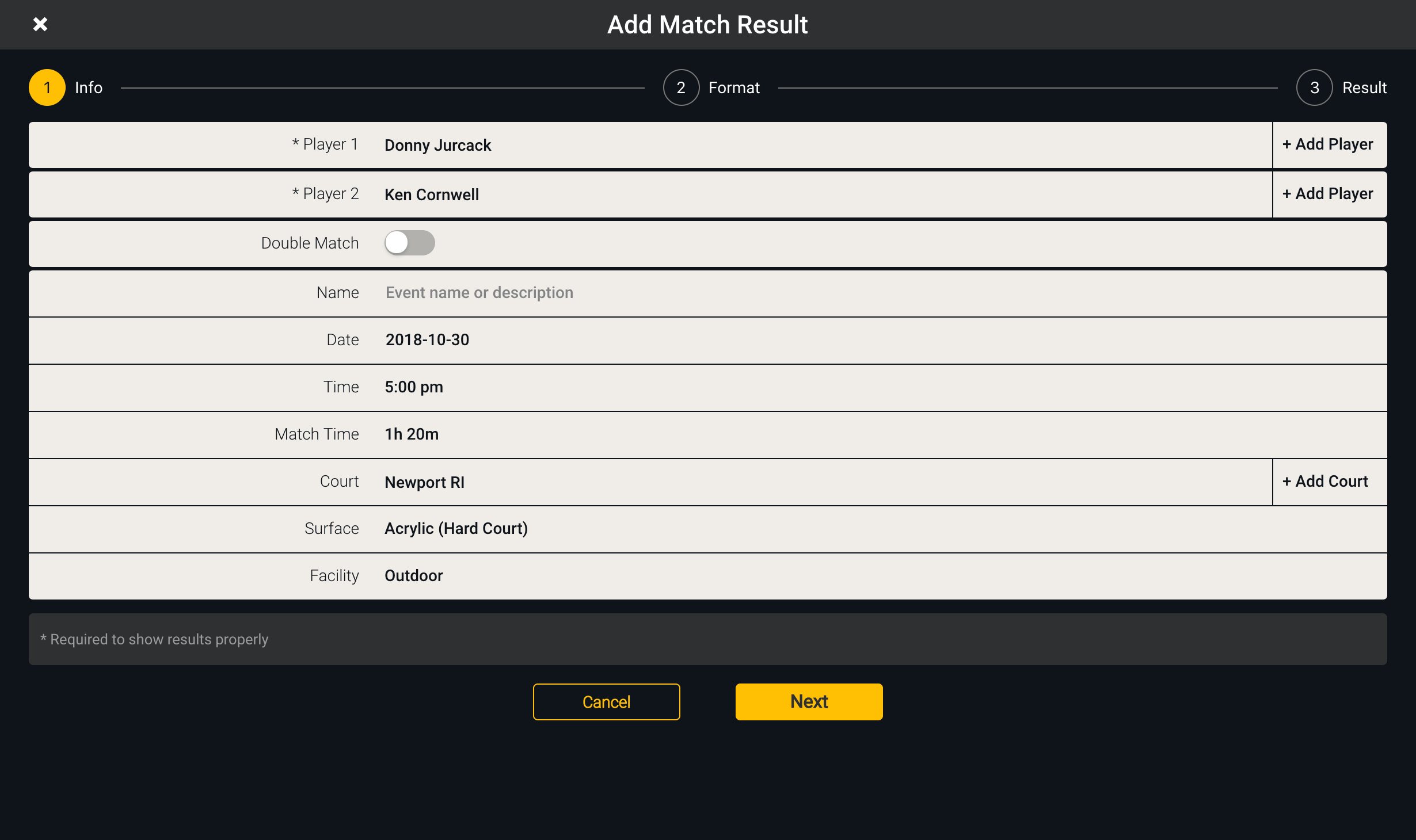
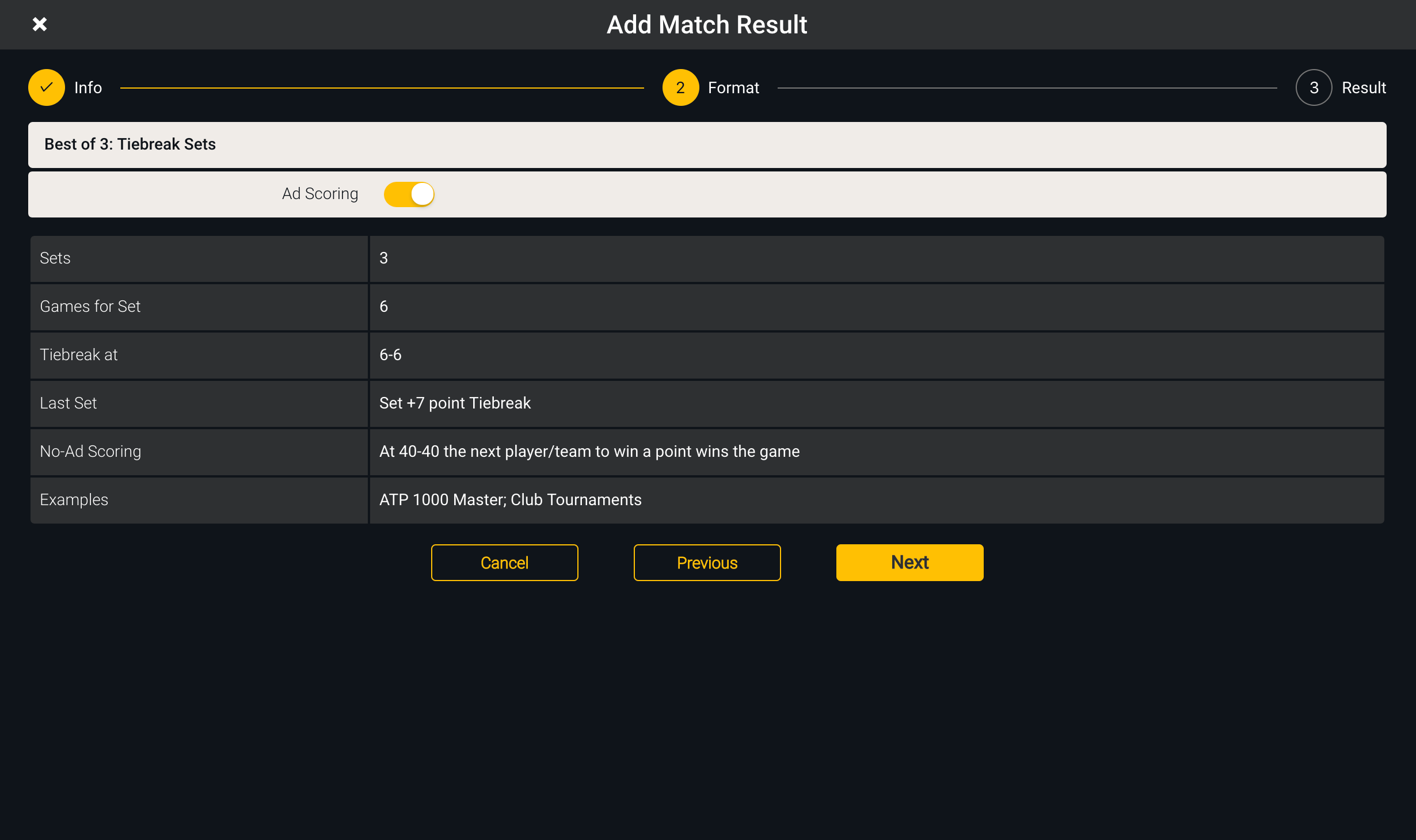
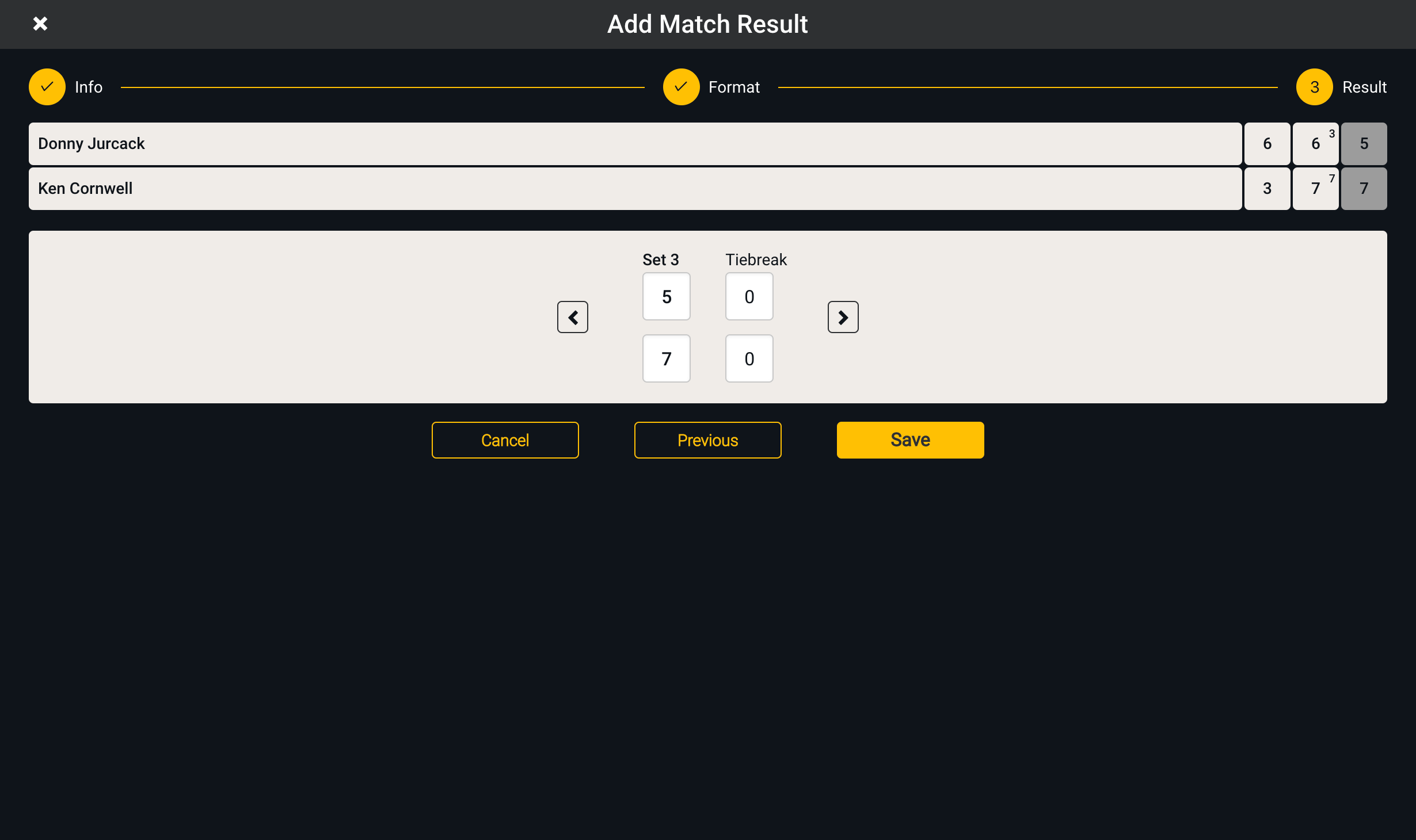
    We closed over 150 tickets with improvements and new features. Now you can add your tennis match results with an easy to use interface directly in your favorite web browser. And, you can see who is the strongest player in your network on your home screen. Login here to explore: https://app.smashpoint.pro


    Step 1: Enter basic match information

    Add Match Step 1

    Step 2: Select format

    Add Match Step 2

    Step 3: Enter match result and submit

    Add Match Step 3
  • Web App Beta

    New York, NY [June 2018] – We are very excited to announce that our web app is in public beta now.  All existing Smashpoint users can Log In or new users can Sign Up for a free account. Several years ago, we began our journey by developing the Smashpoint Cloud, which is capable of storing tennis results and calculating professional statistics. We then followed up with an app for iPhones/iPads + Apple Watch that allows tennis players, coaches and parents to track a tennis match in real time or enter finished results. By releasing the web app, we are reaching another major milestone by giving access to all Smashpoint users with any kind of mobile device or computer. The web app interface automatically adjusts itself to your screen size and with single sign-on you can access your Smashpoint account from multiple devices. That way, you always have your up-to-date tennis data at your fingertips.

    Highlights
    • View all your tennis activities from match to practice that were logged on iOS
    • Add new players and tennis courts
    • Accept invitations from other players
    • View detailed match statistics for singles and doubles,including service, return, and point records
    • Head to Head analysis so you can compare your match records against other players or look up players vs players
    • View results and statistics of connected players
    • Add private notes to your players so you are prepared for the next match
    • Edit your own player profile
    • Familiar user interface for all existing iOS users

    Coming Soon
    • Add match results
    • Point by point match history and momentum graph
    • Tennis AI
    • Light theme (switch between dark and light mode)

    App URL
    https://app.smashpoint.pro

    Thank you for using Smashpoint. We have big plans and we would love to get your feedback and input.
    If you have any questions, please feel free to get in touch.

    P.S.  For quick access, just type in smashpoint.app in your browser 🙂

  • Top 10 Reasons to Play Tennis

    play tennis

    Tennis the Sport for a Lifetime!

    YOUR BODY

    Get Fit
    Lose Weight. Burn Calories– An hour of singles play can burn 580-870 calories.
    (According to Oja, et al, Brit J Sports Med, 2016)

    Live Longer
    Playing just 3 hours/week will reduce your risk of heart disease 56%.
    (According to a 2016 Harvard University study)

    Strengthen Heart, Muscles and Bones
    Compared to other sports, tennis players have the lowest incidence of cardiovascular disease.
    (40-year study conducted by Johns Hopkins University)

    Develop Hand-Eye Coordination
    Playing tennis involves several skills that all contribute to good hand-eye coordination. You can improve your agility, balance, coordination, reaction time and more.

    YOUR LIFE

    Enjoy Family and Friends
    Great for the whole family no matter what your age. With minimal equipment needed and plenty of courts nearby, it’s easy to bring a friend or find one at the courts.

    Develop Teamwork and Sportsmanship
    From doubles play to learn and league play, tennis develops your ability to communicate and work together.

    Improve Social Skills
    Tennis outperforms all other sports in developing positive personality characteristics.
    (According to a study by Dr. Jim Gavin at Concordia University)

    tennis practice

    YOUR BRAIN

    Reduce Stress
    Tennis helps you deal with physical, mental, social and emotional challenges, which increases your capacity to deal with stress.

    Increase Brain Power
    From alertness to tactical thinking, tennis enhances the neural connections in your brain. Kids who play tennis regularly get better grades. (According to a 2013 USTA study)

    Learn to Solve Problems
    Tennis is a sport that is based on evaluating angles, geometry and physics to get the best result, which translates into better problem-solving off the court. In the late 1990s, several experts proposed that tennis, since it requires alertness and tactical thinking, may generate new connections between nerves in the brain and promote a lifetime of continuing brain development.

    Content provided by TIA – Tennis Industry Association. 

    ONLINE RESOURCES

    PlayTennis.com

    USTA – Lot’s of ways to play tennis

    Tennis Industry Association (USA)

    Play Tennis – LTA British Tennis

    DTB – Deutscher Tennis Bund

    ITF – International Tennis Federation

    Play & Stay

    French Tennis Federation