Category: Support

  • Smashpoint Tennis MCP

    Smashpoint Tennis MCP

    Unlock AI Insights from Your Tennis Data

    Smashpoint Tennis MCP uses the Model Context Protocol to connect Smashpoint.pro’s detailed match data directly to your large language models. It empowers your local AI agents to seamlessly query real-time tennis statistics, head-to-head records, and shot metrics, bridging the gap between professional-grade sports analytics and advanced AI reasoning.

    Smashpoint is now available as a connector inside Claude.

    That means your match history, H2H records, stats, and ladder standings travel with you into every Claude conversation — no copy-paste, no switching apps, no manual context-setting. Ask a real question, get an answer grounded in your actual data. A few things you can do right now:

    Before a match

    “Pull my H2H record against Marcus Webb and give me a quick scouting note on where I’ve won and lost points against him.”

    After a tough loss

    “Look at my last 90 days of singles results and tell me where my win rate drops — by surface, by score line, or anything that stands out.”

    Working on your game

    “Based on my results across hard, clay, and grass, which surface should I be prioritizing in practice right now and why?”

    That’s the idea. Your game, in context, whenever you need it.

    Get Started

    The Smashpoint MCP is fully unlocked for all active Pro subscribers. Free accounts can still test the waters with access to the last 3 match results. If you’re not on Pro yet, this is the perfect reason to upgrade. Go to app.smashpoint.pro to upgrade.

    Connect Claude

    Step 1 — Generate your API key

    Log into your Smashpoint account, go to Settings > Integrations, and generate your MCP API key. Copy it — you’ll need it in the next step.

    Step 2 — Add the connector in Claude
    Open Claude and go to:

    1. Customize
    2. Connectors
    3. Add New — select “Add custom connector”
    4. Enter Smashpoint as the name
    5. Enter https://mcp.smashpoint.pro as the URL
    6. Paste your API key when prompted

    That’s it. Claude will confirm the connection and you’re ready to go.

    A Note on Privacy

    Your data stays yours. The Smashpoint MCP only surfaces data from your own account — your matches, your stats, your connected players. Nothing is shared with other users. You can revoke your API key from Settings at any time and the connection drops immediately.

    What’s Next

    This is the first version. We’re already thinking about what comes after — deeper stats, group and ladder context, and eventually org-level access for coaching programs. If you’re a coach or program director at a university or club and want to talk about what that could look like for your team, please get in touch.

    For now — connect, ask, and let your data do some of the work.

  • Smashpoint Cloud Update May 2021

    Smashpoint Cloud

    Smashpoint Cloud Update

    We need a bigger boat! We have outgrown our current cloud hosting and we need to upgrade to a bigger system for best in class performance and so we can continue to ship new features. During the upgrade window our Smashpoint Cloud will be offline for 1-2 hours during that time you will not be able to log into your account.

    LOS ANGELES: MAY 26, 2021 – 10 PM
    NEW YORK: MAY 27, 2021 – 1 AM
    LONDON: MAY 27, 2021 – 6 AM
    MOSCOW : MAY 27, 2021 – 7 AM
    BEIJING: MAY 27, 2021 – 1 PM
    TOKYO: MAY 27, 2021 – 2 PM
    MELBOURNE: MAY 27, 2021 – 3 PM

    Please get in touch if you have any questions or feedback.
  • Apple Watch – Do Not Disturb

    Apple Watch – Do Not Disturb

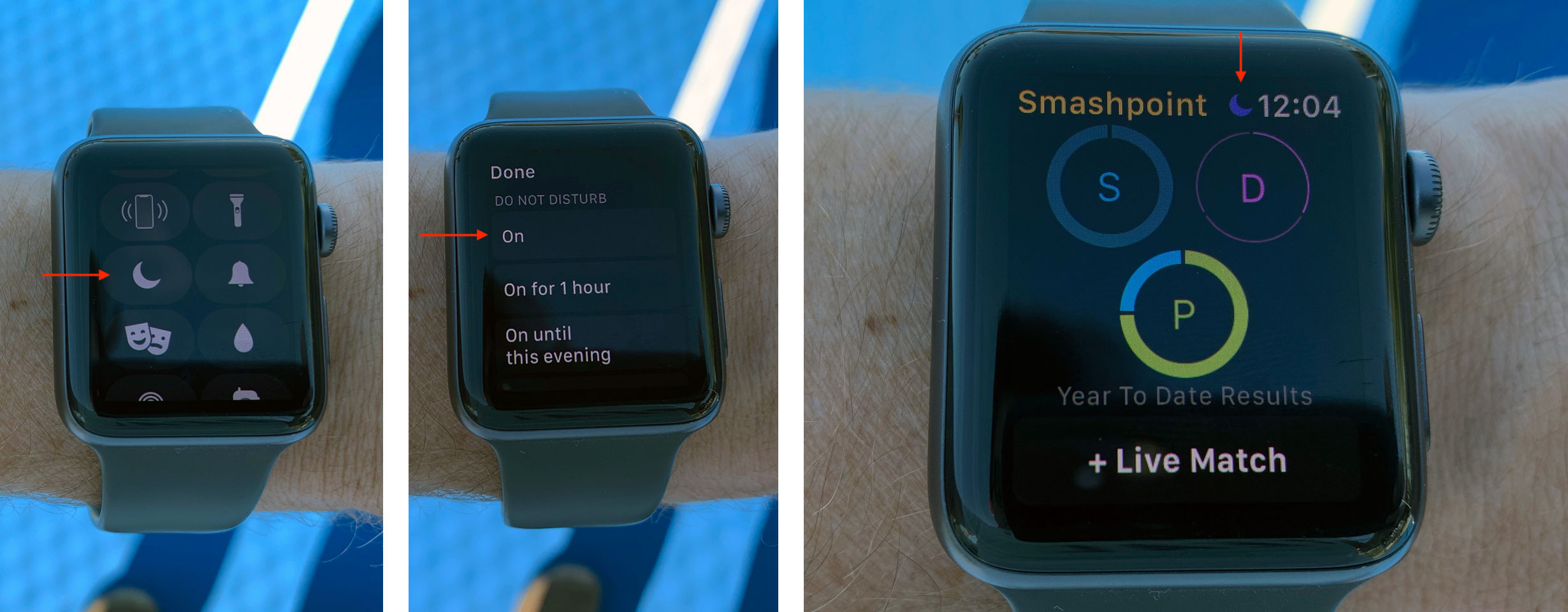
    If you find yourself on a tennis court with an Apple Watch and notifications are taking you off your game. It is time to swipe up on your Apple Watch home screen and touch on “Do Not Disturb”. No worries, it is really easy to turn notifications on/off on your watch. One simple touch to activate or deactivate “Do Not Disturb”. The “Do Not Disturb” screen gives you several options such as “On for 1 hour” or “On until this evening”. So next time you are tracking your tennis match with Smashpoint on your Apple Watch touch “Do Not Disturb” for the best experience. If you have any questions please feel free to get in touch.

    Swipe up on your home screen to get started:

    Notifications on your Apple Watch
    https://support.apple.com/en-us/HT204791

    Use Control Center on your Apple Watch
    https://support.apple.com/en-us/HT206951