Author: Admin

  • Official Match Mode: Smashpoint for Umpires and Referees

    Smashpoint Official Umpire Chair

    For ten years Smashpoint has been the app a parent, a coach or a teammate opens on the side of the court to track a match point by point. Today we are opening it to the person in the chair.

    With Android 1.5, iOS 3.5 and the new Organizations web app, a certified official can run a sanctioned match in Smashpoint: code violations, medical timeouts, rain delays, score corrections and a signed result, all recorded as they happen and all under the rules your federation plays by.

    We call it Official Match Mode.

    Why we built it

    Below the pro tour, officiating runs on paper. A roving umpire covers six courts with a clipboard. A tournament desk finds out about a point penalty when the players walk up arguing about it. When a result is questioned a week later, there is nothing to look at.

    Meanwhile the same match was probably being tracked in Smashpoint by someone in the stands. We had the score, the serve, every point. What we did not have was the authority to say the result counted, or a record of what the official decided along the way.

    Official Match Mode closes that gap. It does not replace the official. It gives them a better clipboard, and gives the federation a record it can trust.

    Pick your rules

    Tennis is governed differently depending on where and at what level you play. The ITF point penalty schedule starts with a warning. The USTA system starts with a point. A junior gets a mandatory ten minute rest after the second set; an adult gets two minutes. Coaching is permitted at a Grand Slam, from designated seats, and not at all in a USTA sanctioned tournament outside a rest period.

    We read the rulebooks so you do not have to. The Organizations web app ships with rules profiles for the ITF World Tennis Tour, USTA Adult and Junior tournaments and USTA Adult League. Each one was built strictly from the official 2026 rulebooks, the ITF World Tennis Tour Regulations and the USTA Friend at Court, with every value traced back to the regulation it came from. Nothing in them is our interpretation. An Owner or Admin picks one in Settings and every official match in the organization runs under it.
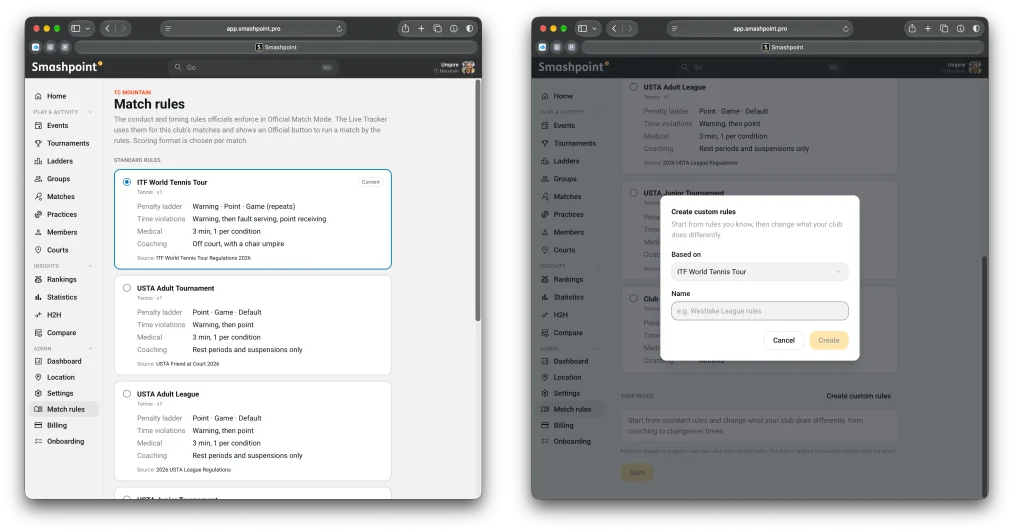
    If your federation or state association plays by its own variant, clone a profile and change what differs. Changeover length, medical timeout limits, whether coaching is allowed, how the violation ladder escalates. Every change is versioned, every match records the exact version it was played under, and the official can see what was changed from the base rules before they walk on court.

    On court

    An official opens the live tracker the same way a parent does. The difference is one button.
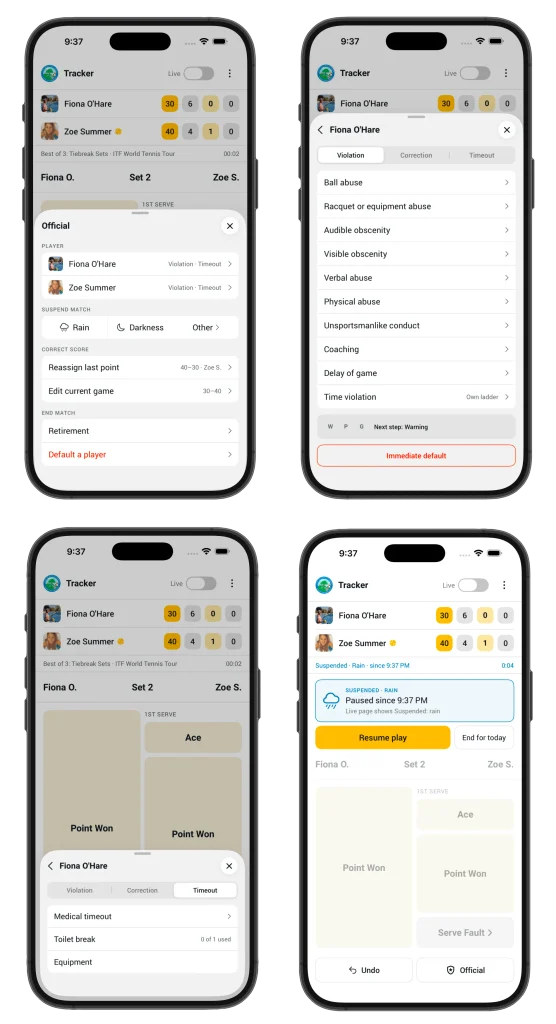
    Tap Official and everything the chair needs is on one sheet. Pick a player to record a violation; the app knows which step of the ladder they are on and applies the penalty, so a point penalty is a point penalty and a game penalty is a game penalty, with the score updated for everyone watching live. Rain and darkness are one tap each. A medical timeout starts the countdown on screen. Score corrections are recorded as corrections, with who made them and why, never as silent edits.

    At the end of the match the official reviews the result, the violations and the suspensions, and signs off. The match is locked and badged Sanctioned. It shows up that way in the organization’s rankings, in the export and on the public match page.

    All of this works with no signal on a back court. Events queue on the phone and sync in order when it reconnects.

    A new role

    Organizations get a new member role, Official. It includes everything a Coach can do, plus running ladders and tournaments, plus Official Match Mode on the live tracker. Owners and Admins can also act as officials, so a tournament director can cover a court without changing their role.

    Officials can record their certification body and number on their profile, and it travels with every match they sign off.

    What comes next

    Rules profiles for high school associations are next, state by state, starting in California. Pickleball and padel get their own profiles when those sports land in Smashpoint. And the same event log that records a code violation is ready to attach a video clip from the fence camera when we get there.

    Available now

    Official Match Mode is included in the Organizations plan. Update to Android 1.5 or iOS 3.5, ask your Owner or Admin to pick your rules in Settings and give you the Official role, and your next match is yours to run.

    Not on Smashpoint yet? Log in or create a free account at app.smashpoint.pro, then create your Organization from the account menu. The first 14 days are on us, no card required, and every member who tracks or officiates a match gets Smashpoint Pro included.

    If you officiate junior, college or club tennis and want to tell us what we got wrong, we would like to hear from you. Get in touch.

  • The full Smashpoint experience, now on Google Play. Plus video replay for the points that matter.

    Smashpoint Google Play

    Android players, the wait is over. Smashpoint is now available on the Google Play Store, and it’s the complete app: everything you can do on iPhone, you can now do on Android.

    Everything, not a lite version

    We didn’t ship a stripped-down Android build to check a box. The Google Play version has the same five levels of live match tracking, from quick games-only scoring to full point-by-point detail with serve, rally and shot outcome. It has the same insights: ELO ratings, head-to-head records, momentum and pressure charts, and the shot quality breakdowns that show you what actually decided a match. It has the same saved match pages with the same Info, Analysis, Patterns, Stats and History tabs, so a match you tracked on Android looks identical when your doubles partner opens it on iPhone or on the web.

    Google Play

    Opt-in live broadcasting and shareable public match URLs work the same way too. Track a match courtside, and friends and family can follow along from any browser. And, as always, your data is private by default. Nothing is shared unless you choose to share it.

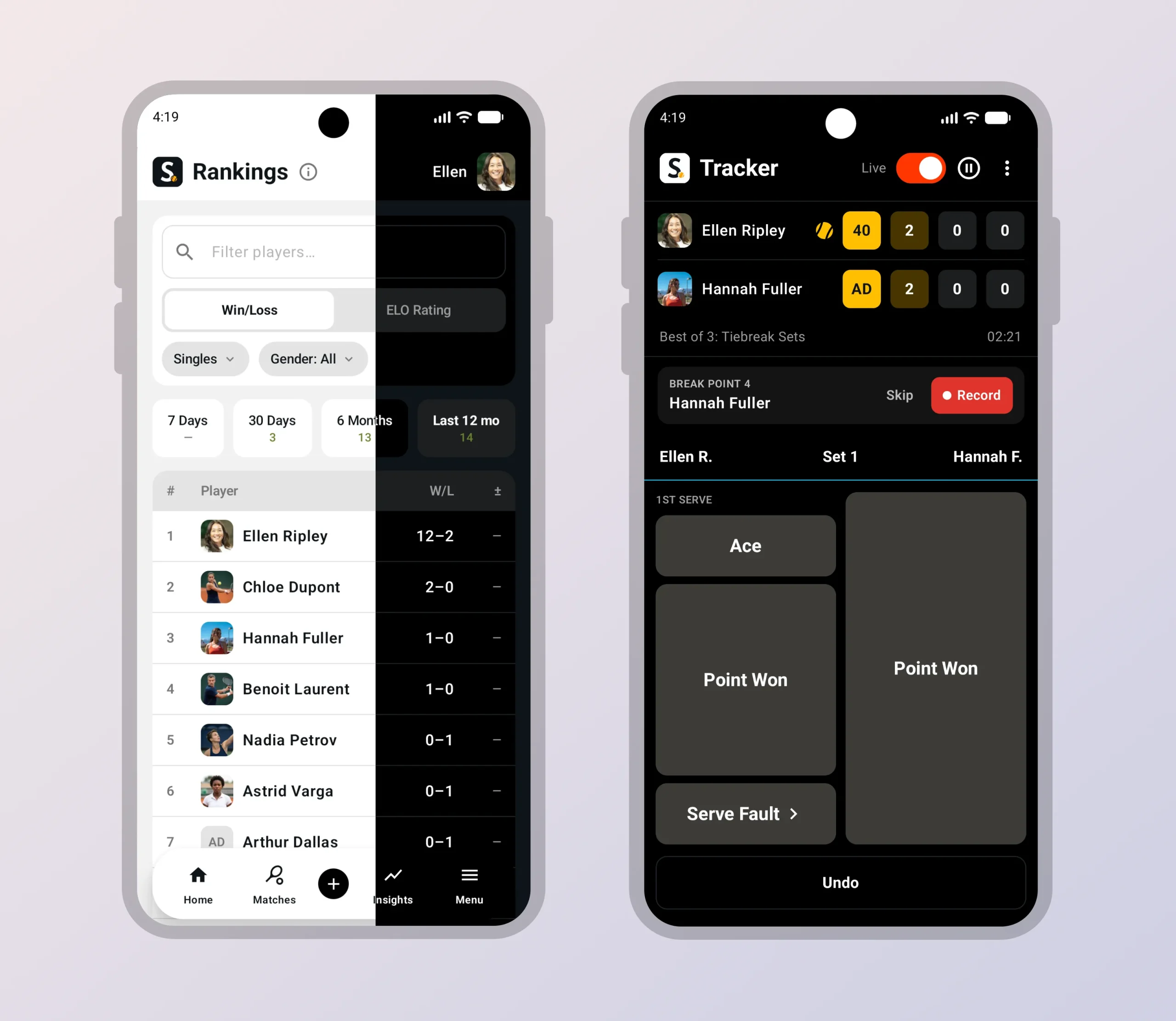
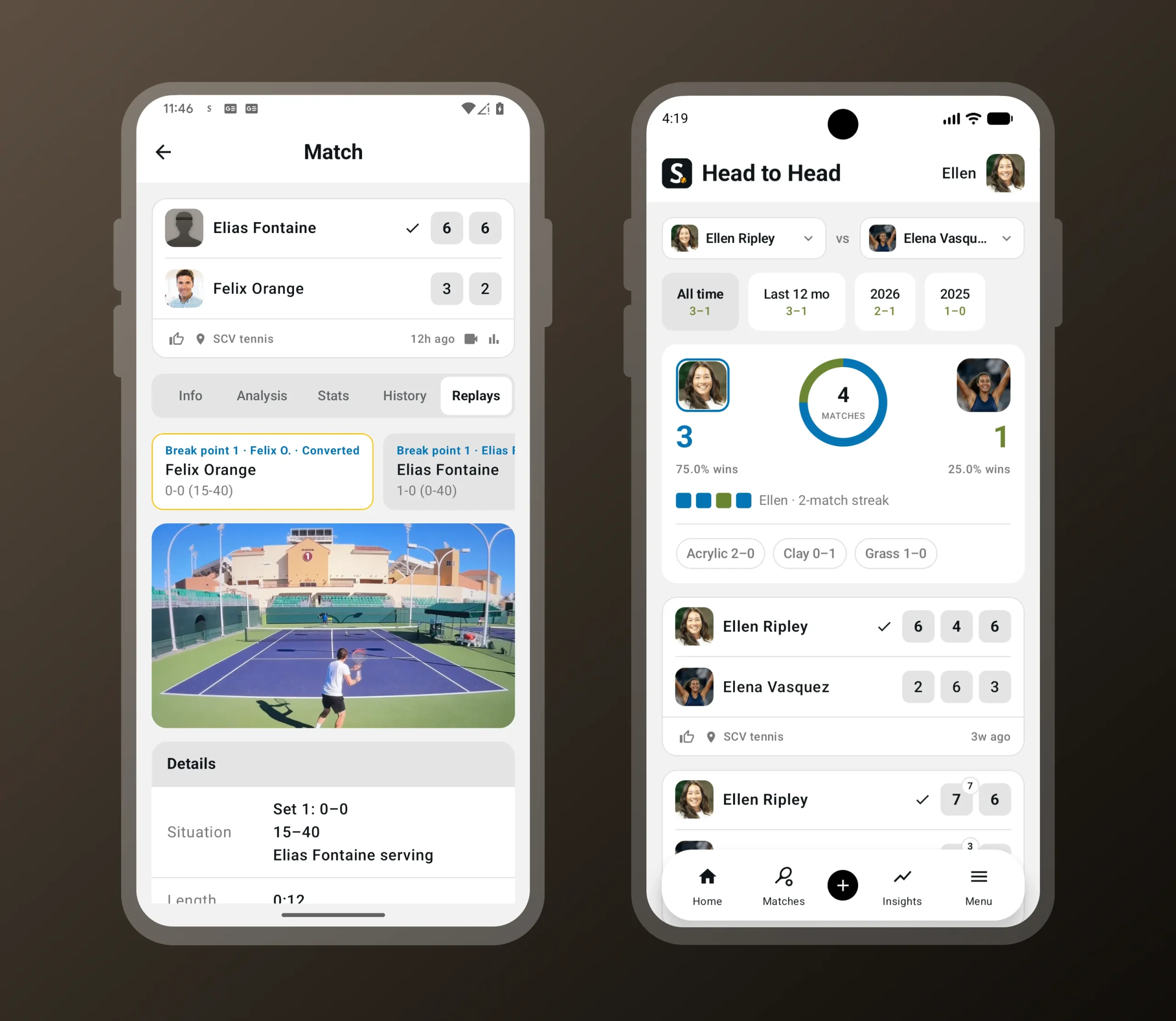
    When you’re tracking a match live and a critical point comes up, Smashpoint prompts you to record the next point. Break point, set point, match point: you choose which moments trigger the prompt, so you can capture only the biggest points or every swing in momentum. Hold up your phone, tap record, enter the outcome as usual, and the clip is saved with the match. No switching apps, no scrolling through your camera roll later trying to find the moment. Replays live in a new Replays tab on the saved match page and are linked directly to the point they belong to in the match history, so you can jump from “break point converted in the second set” straight to the footage.

    Video replay of a critical point in the Smashpoint Android app
    Record the next point when a break, set or match point comes up. Replays are saved with the match.

    New: video replay at critical points

    This release also introduces something new to Smashpoint on every platform: video replay.

    Smashpoint Google Play Store Tour

    Replays follow the same privacy rules as everything else in Smashpoint. Video is never shown on public match pages. Clips are only visible inside Smashpoint to you and the friends you’re connected with, and the recorder controls who those people are.

    Video replay is available on Android and iOS today, with playback on the web app and on Apple TV.

    One platform, every screen

    With Android on board, Smashpoint is now a complete platform:

    Track a match on your watch, review it on your tablet, share it from your phone, study the patterns on your laptop, and watch the replay on the big screen. Every app talks to the same account and the same data, so nothing is stranded on one device.

    That matters because Smashpoint isn’t built for one kind of user. Individual players use it to track their own matches and watch their game improve. Parents use it to record a child’s matches, including opponents who don’t have an account. Coaches use it to run practice sessions, compare players and spot what to work on next. Schools, clubs and federations use Smashpoint Organizations to manage rosters, ladders, tournaments and rankings across an entire program. Until now, an Android player on a team meant a gap in the picture. Not anymore.

    Get Smashpoint on Google Play

    Smashpoint for Android is free to download on Google Play. If you already have a Smashpoint account, just sign in and everything you’ve tracked will be there. If you’re new, you can sign up in the app with Google or with your email.

    Google Play

    Have an Android-specific request or found something that doesn’t feel right? Tell us. This is version one on a new platform, and the fastest way for it to get better is hearing from the people using it.

  • Smashpoint for Apple TV: Tennis Video Replay Comes to the Big Screen

    Smashpoint Apple TV App

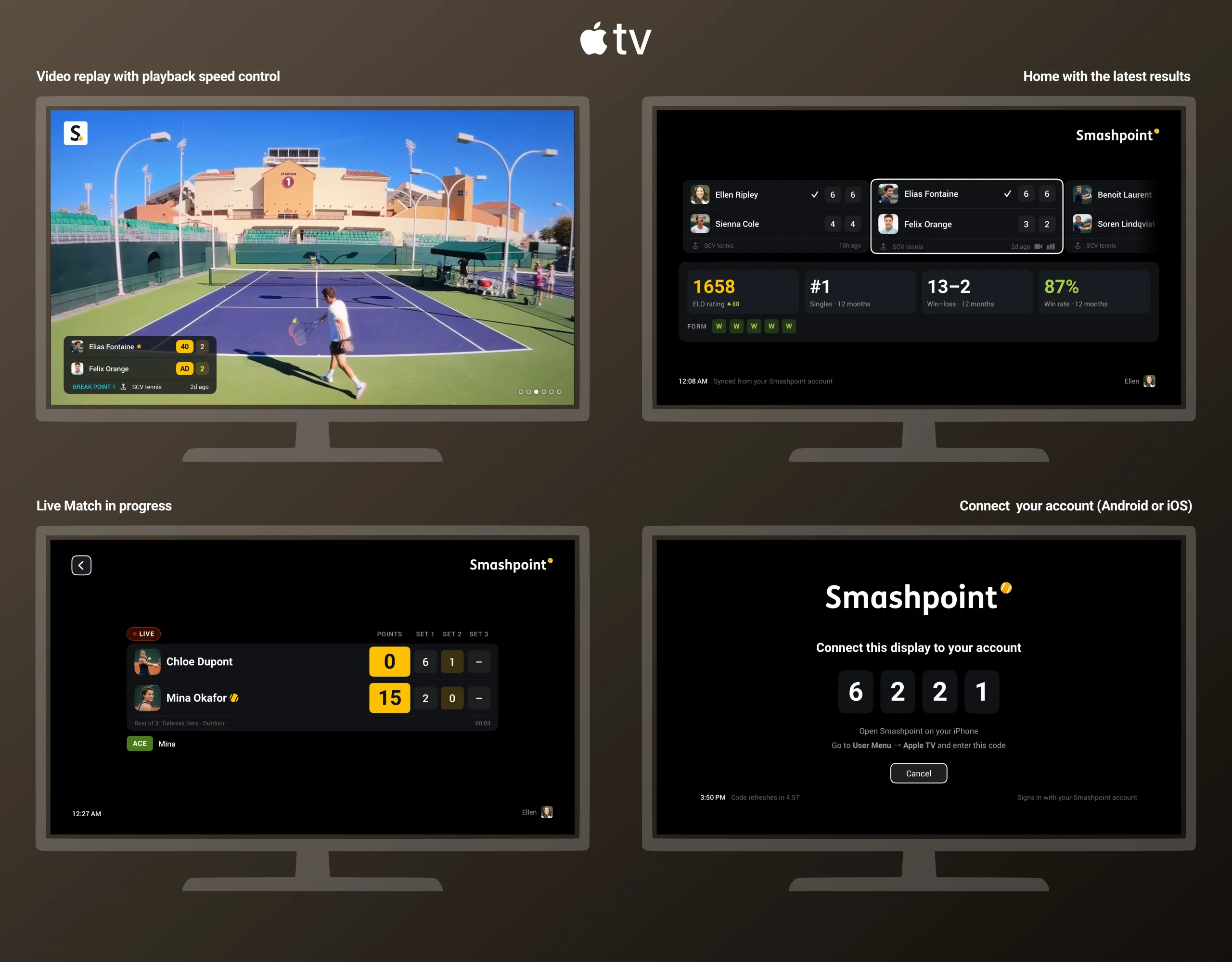
    Smashpoint for Apple TV has been the place to follow a match live from the couch: the scoreboard, the serve indicator, the set-by-set breakdown, all updating point by point as someone tracks courtside. Today it gets the feature it was waiting for. Video Replay is now on Apple TV, so the break points, set points and match points recorded on a phone show up on your TV, ready to watch.

    How it works

    Recording happens on the phone. When someone is tracking a match live on iPhone or Android and a critical point comes up, Smashpoint prompts them to record the next point. They hold up the phone, tap record, enter the outcome as usual, and the clip is trimmed and saved against that exact point in the match. The tracker decides which moments trigger the prompt: break points, set points, match points, or any combination.

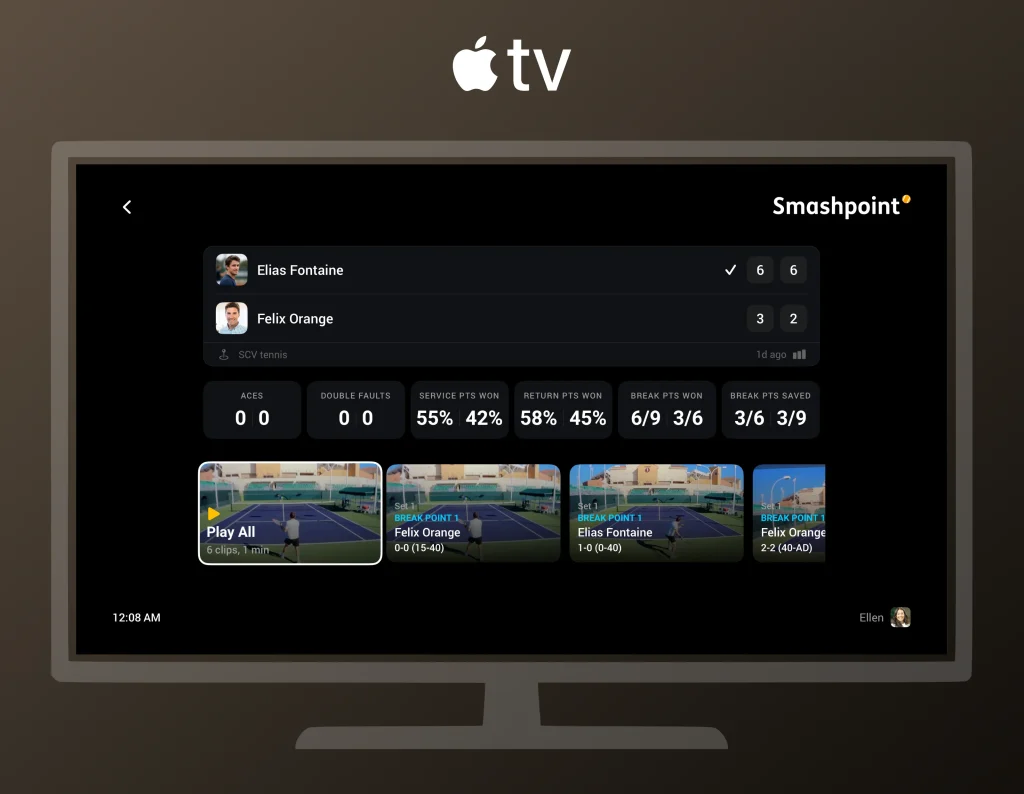
    Watching happens on Apple TV. Open the match on your TV and the replays are right there next to the score. Pick a clip, see the context (which set, what score, who was serving), and watch the point. If you were following the match live, the replays land in the same view you already had open, so you don’t leave the scoreboard to find them.

    Replays appear alongside the score on Apple TV, labeled with the set, the score and who was serving.

    When replays show up

    Clips appear on Apple TV as soon as they’ve uploaded from the phone, and the person recording controls when that happens with one setting in the app.

    Smashpoint Apple TV App Tour

    With Upload on Wi-Fi only (the default), clips wait on the phone until it reaches Wi-Fi, which for most people means they appear on the TV after the match, once the phone is back home or at the club. With Upload on mobile data, clips upload from the court as soon as they’re recorded, so someone watching live at home can see a set point replay minutes after it happened, while the match is still going on. Either way, the recorder can tap Upload now on any single clip to send it right away.

    The choice is about data usage, not quality. Clips are the same on both settings; the only difference is when they leave the phone.

    Private by default, like everything in Smashpoint

    A replay is visible only to the person who recorded it until they choose to share it with the friends they’re connected with in Smashpoint. Sharing is per clip, and video is never shown on public match pages. That’s true on Apple TV too: the TV shows the clips the paired account is allowed to see, and nothing else. A parent who records their child’s matches sees every clip on the family TV. A connected coach sees the clips the parent chose to share. Nobody else sees any of it.

    Getting set up

    Smashpoint for Apple TV is free. Install it from the App Store on your Apple TV, open it, and enter the short code it shows into the Smashpoint app on your iPhone. From then on, everything that account can see in the app is on the TV: live matches, completed matches, season stats and now replays. One Apple TV can be paired to more than one account, so a household with two players or a clubhouse with a shared screen can switch between them.

    To record, update Smashpoint on iPhone or Android to the latest version, start a live match in any point-tracking mode, and switch on Record Video on the Format step. The app will ask for camera and microphone permission the first time.

    Google Play

    With this release, Smashpoint runs on iPhone, iPad, Apple Watch, Android, the web and Apple TV, and Smashpoint Cloud computes and stores all of it. Every match, rating, stat and replay lives in one place, so each device can do what it’s best at: the phone and watch track courtside, the web app gives you a desktop-class experience for digging into patterns and stats, and the TV is where the whole family watches. If you have an Apple TV in the house, this is the best way to relive a match.